Introduction to Geospatial AI

python
segmentation
AI
Workshop conducted at NIE for geospatial AI performing instance segmentation on high res imagery
Author

Aman Bagrecha

Published

November 15, 2025

Geospatial Instance Segmentation with TorchGeo + Mask R-CNN

NWPU VHR-10 (Very High Resolution, 10 classes)

Link to github repository for installation steps on local here

Goal for this workshop

By the end, you’ll be able to:

  1. Load the NWPU VHR-10 dataset from TorchGeo (remote sensing, 10 object classes).
  2. Explore images, bounding boxes, and instance masks.
  3. Build a Mask R-CNN model (from torchvision) for instance segmentation.
  4. Train on a small subset (for speed) and visualize predictions.

We’ll use:

0. Environment setup

Run this once at the top of your notebook.

⚠️ Warning for instructors:

  • VHR-10 needs the datasets extra, plus pycocotools for COCO-style annotations.
  • Always request a GPU runtime in Colab (T4 is enough).

💡 Idea: Have students run the pip cell themselves so they see what libraries are used.

Code
# If you're on Colab, uncomment this cell:
!pip install -q "torchgeo[datasets]" torch torchvision matplotlib

import torch
import torchvision
from torch.utils.data import DataLoader, Subset
import matplotlib.pyplot as plt

from torchgeo.datasets import VHR10

device = torch.device("cuda" if torch.cuda.is_available() else "cpu")
print("Using device:", device)

# 🧪 Practice 0:
# 1. Run this cell and see if you're on CPU or GPU.
# 2. If you have a GPU: print(torch.cuda.device_count()) to see how many devices are available.

print("CUDA device count:", torch.cuda.device_count())
     ━━━━━━━━━━━━━━━━━━━━━━━━━━━━━━━━━━━━━━━━ 56.6/56.6 kB 2.9 MB/s eta 0:00:00

     ━━━━━━━━━━━━━━━━━━━━━━━━━━━━━━━━━━━━━━━━ 42.4/42.4 kB 1.6 MB/s eta 0:00:00

   ━━━━━━━━━━━━━━━━━━━━━━━━━━━━━━━━━━━━━━━━ 17.2/17.2 MB 92.9 MB/s eta 0:00:00

   ━━━━━━━━━━━━━━━━━━━━━━━━━━━━━━━━━━━━━━━━ 240.5/240.5 kB 28.1 MB/s eta 0:00:00

   ━━━━━━━━━━━━━━━━━━━━━━━━━━━━━━━━━━━━━━━━ 1.1/1.1 MB 76.8 MB/s eta 0:00:00

   ━━━━━━━━━━━━━━━━━━━━━━━━━━━━━━━━━━━━━━━━ 86.1/86.1 kB 10.3 MB/s eta 0:00:00

   ━━━━━━━━━━━━━━━━━━━━━━━━━━━━━━━━━━━━━━━━ 859.3/859.3 kB 71.8 MB/s eta 0:00:00

   ━━━━━━━━━━━━━━━━━━━━━━━━━━━━━━━━━━━━━━━━ 827.9/827.9 kB 60.5 MB/s eta 0:00:00

   ━━━━━━━━━━━━━━━━━━━━━━━━━━━━━━━━━━━━━━━━ 9.5/9.5 MB 106.4 MB/s eta 0:00:00

   ━━━━━━━━━━━━━━━━━━━━━━━━━━━━━━━━━━━━━━━━ 22.3/22.3 MB 95.1 MB/s eta 0:00:00

   ━━━━━━━━━━━━━━━━━━━━━━━━━━━━━━━━━━━━━━━━ 507.6/507.6 kB 46.1 MB/s eta 0:00:00

   ━━━━━━━━━━━━━━━━━━━━━━━━━━━━━━━━━━━━━━━━ 154.8/154.8 kB 18.3 MB/s eta 0:00:00

   ━━━━━━━━━━━━━━━━━━━━━━━━━━━━━━━━━━━━━━━━ 983.2/983.2 kB 68.3 MB/s eta 0:00:00

   ━━━━━━━━━━━━━━━━━━━━━━━━━━━━━━━━━━━━━━━━ 75.0/75.0 kB 7.4 MB/s eta 0:00:00

   ━━━━━━━━━━━━━━━━━━━━━━━━━━━━━━━━━━━━━━━━ 605.0/605.0 kB 49.9 MB/s eta 0:00:00

   ━━━━━━━━━━━━━━━━━━━━━━━━━━━━━━━━━━━━━━━━ 165.6/165.6 kB 19.7 MB/s eta 0:00:00

   ━━━━━━━━━━━━━━━━━━━━━━━━━━━━━━━━━━━━━━━━ 154.5/154.5 kB 17.8 MB/s eta 0:00:00

   ━━━━━━━━━━━━━━━━━━━━━━━━━━━━━━━━━━━━━━━━ 3.0/3.0 MB 16.9 MB/s eta 0:00:00

   ━━━━━━━━━━━━━━━━━━━━━━━━━━━━━━━━━━━━━━━━ 831.6/831.6 kB 62.9 MB/s eta 0:00:00

   ━━━━━━━━━━━━━━━━━━━━━━━━━━━━━━━━━━━━━━━━ 760.5/760.5 kB 61.7 MB/s eta 0:00:00

   ━━━━━━━━━━━━━━━━━━━━━━━━━━━━━━━━━━━━━━━━ 1.6/1.6 MB 91.4 MB/s eta 0:00:00

Using device: cuda

CUDA device count: 1

1. Load and explore the VHR-10 dataset

VHR-10 (NWPU VHR-10) is a very high resolution (0.08–2 m) remote sensing dataset with:

  • 800 images total
    • 650 “positive” images (contain at least one object)
    • 150 “negative” images (no objects)
  • 10 object classes: airplane, ship, storage tank, baseball diamond, tennis court, basketball court, ground track field, harbor, bridge, vehicle.

TorchGeo provides:

  • images as tensors (C, H, W)
  • COCO-style annotations converted into boxes, labels, and masks.

⚠️ Important:

  • Use split="positive" for detection/segmentation (only positives have annotations).
Code
root = "data"  # change if you want
ds = VHR10(root=root, split="positive", download=True, checksum=False)
print("Dataset length (positive images):", len(ds))

sample = ds[0]
print("Keys in one sample:", sample.keys())
print("Image shape:", sample["image"].shape)  # (C, H, W)
print("Boxes shape:", sample["bbox_xyxy"].shape)
print("Labels shape:", sample["label"].shape)
print("Has masks:", "mask" in sample)
loading annotations into memory...
Done (t=0.03s)
creating index...
index created!
Dataset length (positive images): 650
Keys in one sample: dict_keys(['image', 'label', 'bbox_xyxy', 'mask'])
Image shape: torch.Size([3, 808, 958])
Boxes shape: torch.Size([1, 4])
Labels shape: torch.Size([1])
Has masks: True

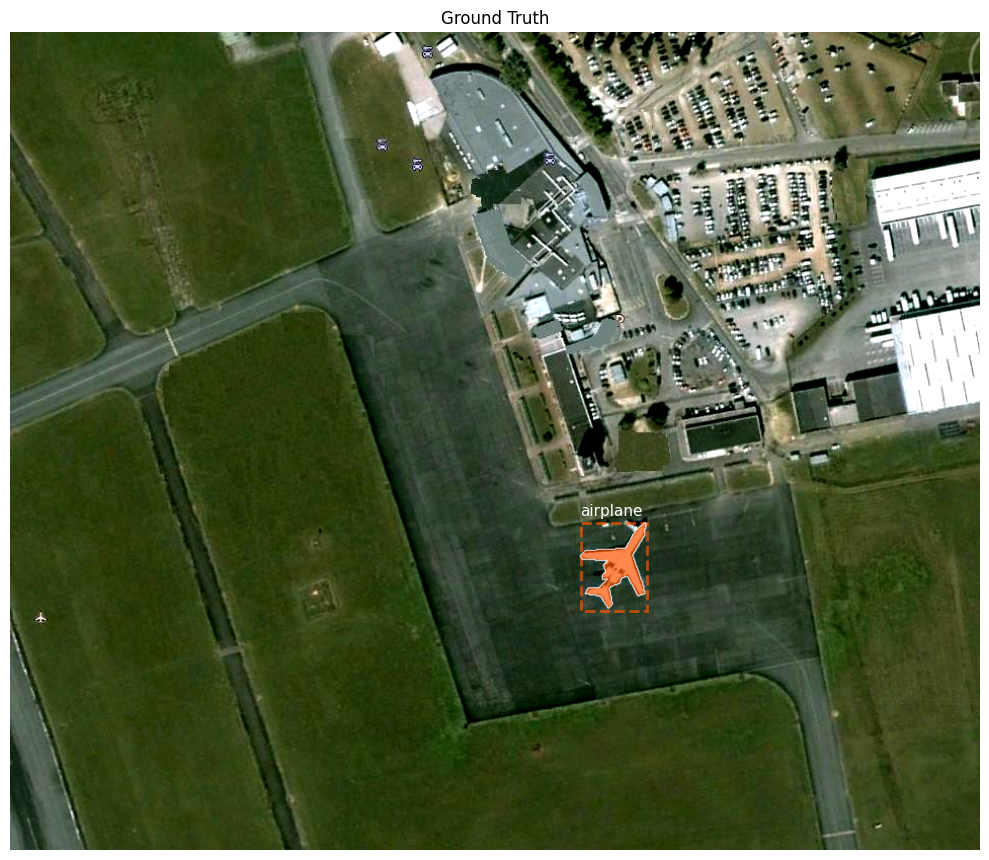
Visualize an image with ground truth boxes & masks

TorchGeo’s plot method is built in for VHR-10 and can display:

  • RGB image
  • bounding boxes
  • masks (if present)

This is perfect to see what instance segmentation labels look like.

Code
ds.plot(sample)  # draws image with GT boxes + masks
plt.show()

# 🧪 Practice 1:
# 1. Pick a random index, e.g. idx = 42, and visualize that sample with ds.plot(ds[idx]).
# 2. Print the number of objects in that image: len(sample["labels"]).

# Example (uncomment):
# idx = 42
# sample = ds[idx]
# print("Number of objects:", len(sample["labels"]))
# ds.plot(sample); plt.show()

2. Simple preprocessing & DataLoader

Mask R-CNN in torchvision expects:

  • images as float32 tensors in [0, 1] range
  • a list of images (variable size allowed)
  • a list of target dicts, each with:
    • boxes: [N, 4]
    • labels: [N]
    • masks (optional): [N, H, W]

TorchGeo already:

  • returns image as float tensor (0–255)
  • gives boxes, labels, masks per sample

We’ll:

  1. Normalize image / 255.0 using a small transform function.
  2. Use a custom collate_fn that returns a list of samples (no stacking), since image sizes differ.
Code
def transform_to_unit_range(sample: dict) -> dict:
    # Normalize image to [0, 1] range.
    image = sample["image"] / 255.0
    sample["image"] = image
    return sample

# Recreate dataset with transform
ds = VHR10(root=root, split="positive", download=False, transforms=transform_to_unit_range)
sample = ds[0]
print("Image min/max after normalization:",
      sample["image"].min().item(), sample["image"].max().item())

def collate_fn(batch):
    # Simple collate function for detection / instance segmentation.
    # Input: list of samples (dicts)
    # Output: same list (we handle conversion in the training loop).
    return batch

# For speed in workshop, use a small subset (e.g. first 100 images)
subset_indices = list(range(100))
train_dataset = Subset(ds, subset_indices)

train_loader = DataLoader(
    train_dataset,
    batch_size=2,
    shuffle=True,
    num_workers=2,
    collate_fn=collate_fn,
)

print("Batches in train_loader:", len(train_loader))

# 🧪 Practice 2:
# Inspect one batch and print image shapes:
# batch = next(iter(train_loader))
# for i, s in enumerate(batch):
#     print(i, s["image"].shape)
loading annotations into memory...
Done (t=0.03s)
creating index...
index created!
Image min/max after normalization: 0.0 1.0
Batches in train_loader: 50

3. Build Mask R-CNN (torchvision)

We’ll use maskrcnn_resnet50_fpn from torchvision:

  • Backbone: ResNet-50 + FPN
  • Detection head: region proposals + class & box prediction
  • Segmentation head: mask prediction per instance

VHR-10 has 10 classes + background, and VHR10.categories includes 'background' at index 0.

Code
from torchvision.models.detection import (
    maskrcnn_resnet50_fpn,
    MaskRCNN_ResNet50_FPN_Weights,
)
from torchvision.models.detection.faster_rcnn import FastRCNNPredictor
from torchvision.models.detection.mask_rcnn import MaskRCNNPredictor

# Get class count from dataset (handle Subset)
if isinstance(train_dataset, Subset):
    base_ds = train_dataset.dataset  # underlying VHR10
else:
    base_ds = train_dataset

num_classes = len(base_ds.categories)
print("Number of classes (including background):", num_classes)

# 1) Start from COCO-pretrained weights (good initialization)
weights = MaskRCNN_ResNet50_FPN_Weights.COCO_V1
model = maskrcnn_resnet50_fpn(weights=weights)
model.to(device)

# 2) Replace classification head (box predictor)
in_features = model.roi_heads.box_predictor.cls_score.in_features
model.roi_heads.box_predictor = FastRCNNPredictor(in_features, num_classes)

# 3) Replace mask head
in_features_mask = model.roi_heads.mask_predictor.conv5_mask.in_channels
hidden_layer = 256
model.roi_heads.mask_predictor = MaskRCNNPredictor(
    in_features_mask,
    hidden_layer,
    num_classes,
)

model.to(device)
print("Model ready.")

# ⚠️ Note: We keep most COCO-trained weights and only reinitialize the last heads.
Number of classes (including background): 11
Model ready.

4. Training loop (mini version for workshop)

For each batch:

  1. Convert list of samples → images (list of tensors) + targets (list of dicts).
  2. Forward pass: loss_dict = model(images, targets).
  3. Sum loss terms and backprop.

We’ll only train for 1–2 epochs on a subset of 100 images so it runs quickly.

Code
# Optimizer
params = [p for p in model.parameters() if p.requires_grad]
optimizer = torch.optim.SGD(params, lr=0.005, momentum=0.9, weight_decay=0.0005)

num_epochs = 2

for epoch in range(num_epochs):
    model.train()
    epoch_loss = 0.0

    for batch_idx, batch in enumerate(train_loader):
        # batch is a list of samples (dicts)
        images = [b["image"].to(device) for b in batch]

        targets = []
        for b in batch:
            target = {
                "boxes": b["bbox_xyxy"].to(device),
                "labels": b["label"].to(device),
            }
            if "mask" in b:
                target["masks"] = b["mask"].to(device)
            targets.append(target)

        loss_dict = model(images, targets)
        loss = sum(loss_dict.values())

        optimizer.zero_grad()
        loss.backward()
        optimizer.step()

        epoch_loss += loss.item()

        if (batch_idx + 1) % 10 == 0:
            print(
                f"Epoch [{epoch+1}/{num_epochs}] "
                f"Batch [{batch_idx+1}/{len(train_loader)}] "
                f"Loss: {loss.item():.4f}"
            )

    avg_loss = epoch_loss / len(train_loader)
    print(f"Epoch [{epoch+1}/{num_epochs}] Average loss: {avg_loss:.4f}")

# 🧪 Practice 3:
# - Change num_epochs to 1 or 3 and observe training time and loss.
# - Change batch_size in the DataLoader to 4 and see if GPU memory is okay.
Epoch [1/2] Batch [10/50] Loss: 0.9551
Epoch [1/2] Batch [20/50] Loss: 0.8104
Epoch [1/2] Batch [30/50] Loss: 1.2225
Epoch [1/2] Batch [40/50] Loss: 1.1001
Epoch [1/2] Batch [50/50] Loss: 1.4788
Epoch [1/2] Average loss: 1.1907
Epoch [2/2] Batch [10/50] Loss: 0.5504
Epoch [2/2] Batch [20/50] Loss: 0.5098
Epoch [2/2] Batch [30/50] Loss: 0.9163
Epoch [2/2] Batch [40/50] Loss: 0.4485
Epoch [2/2] Batch [50/50] Loss: 0.5293
Epoch [2/2] Average loss: 0.6151

5. Inference & visualization

Now we’ll:

  1. Take a few samples from the dataset.
  2. Run model in eval() mode without targets → predictions.
  3. Plot:
    • image
    • ground-truth boxes
    • predicted boxes + masks + scores

We’ll reuse TorchGeo’s plot method and feed predictions back into the sample dict using keys:

  • prediction_boxes
  • prediction_labels
  • prediction_scores
  • prediction_masks
Code
sample
{'image': tensor([[[0.3059, 0.3059, 0.3098,  ..., 0.3765, 0.3686, 0.3647],
          [0.3020, 0.3020, 0.3098,  ..., 0.3804, 0.3725, 0.3686],
          [0.2941, 0.2980, 0.3059,  ..., 0.3804, 0.3686, 0.3569],
          ...,
          [0.4431, 0.4431, 0.4471,  ..., 0.3373, 0.3333, 0.3333],
          [0.4431, 0.4431, 0.4471,  ..., 0.3373, 0.3333, 0.3294],
          [0.4392, 0.4431, 0.4431,  ..., 0.3412, 0.3333, 0.3294]],
 
         [[0.3490, 0.3490, 0.3529,  ..., 0.4275, 0.4196, 0.4157],
          [0.3451, 0.3451, 0.3529,  ..., 0.4314, 0.4235, 0.4196],
          [0.3333, 0.3373, 0.3451,  ..., 0.4314, 0.4196, 0.4078],
          ...,
          [0.4941, 0.4941, 0.4980,  ..., 0.3569, 0.3529, 0.3529],
          [0.4941, 0.4941, 0.4980,  ..., 0.3569, 0.3529, 0.3490],
          [0.4902, 0.4941, 0.4941,  ..., 0.3608, 0.3529, 0.3490]],
 
         [[0.1922, 0.1922, 0.1961,  ..., 0.3098, 0.3098, 0.3059],
          [0.1882, 0.1882, 0.1961,  ..., 0.3137, 0.3137, 0.3098],
          [0.1882, 0.1922, 0.2000,  ..., 0.3137, 0.3098, 0.2980],
          ...,
          [0.4667, 0.4588, 0.4627,  ..., 0.2314, 0.2275, 0.2275],
          [0.4667, 0.4588, 0.4627,  ..., 0.2314, 0.2275, 0.2235],
          [0.4627, 0.4588, 0.4588,  ..., 0.2353, 0.2275, 0.2235]]]),
 'label': tensor([1]),
 'bbox_xyxy': tensor([[563., 485., 629., 571.]]),
 'mask': tensor([[[0, 0, 0,  ..., 0, 0, 0],
          [0, 0, 0,  ..., 0, 0, 0],
          [0, 0, 0,  ..., 0, 0, 0],
          ...,
          [0, 0, 0,  ..., 0, 0, 0],
          [0, 0, 0,  ..., 0, 0, 0],
          [0, 0, 0,  ..., 0, 0, 0]]], dtype=torch.uint8)}
Code
sample_for_plot
{'image': tensor([[[0.3059, 0.3059, 0.3098,  ..., 0.3765, 0.3686, 0.3647],
          [0.3020, 0.3020, 0.3098,  ..., 0.3804, 0.3725, 0.3686],
          [0.2941, 0.2980, 0.3059,  ..., 0.3804, 0.3686, 0.3569],
          ...,
          [0.4431, 0.4431, 0.4471,  ..., 0.3373, 0.3333, 0.3333],
          [0.4431, 0.4431, 0.4471,  ..., 0.3373, 0.3333, 0.3294],
          [0.4392, 0.4431, 0.4431,  ..., 0.3412, 0.3333, 0.3294]],
 
         [[0.3490, 0.3490, 0.3529,  ..., 0.4275, 0.4196, 0.4157],
          [0.3451, 0.3451, 0.3529,  ..., 0.4314, 0.4235, 0.4196],
          [0.3333, 0.3373, 0.3451,  ..., 0.4314, 0.4196, 0.4078],
          ...,
          [0.4941, 0.4941, 0.4980,  ..., 0.3569, 0.3529, 0.3529],
          [0.4941, 0.4941, 0.4980,  ..., 0.3569, 0.3529, 0.3490],
          [0.4902, 0.4941, 0.4941,  ..., 0.3608, 0.3529, 0.3490]],
 
         [[0.1922, 0.1922, 0.1961,  ..., 0.3098, 0.3098, 0.3059],
          [0.1882, 0.1882, 0.1961,  ..., 0.3137, 0.3137, 0.3098],
          [0.1882, 0.1922, 0.2000,  ..., 0.3137, 0.3098, 0.2980],
          ...,
          [0.4667, 0.4588, 0.4627,  ..., 0.2314, 0.2275, 0.2275],
          [0.4667, 0.4588, 0.4627,  ..., 0.2314, 0.2275, 0.2235],
          [0.4627, 0.4588, 0.4588,  ..., 0.2353, 0.2275, 0.2235]]]),
 'boxes': tensor([[563., 485., 629., 571.]]),
 'labels': tensor([1]),
 'masks': tensor([[[0, 0, 0,  ..., 0, 0, 0],
          [0, 0, 0,  ..., 0, 0, 0],
          [0, 0, 0,  ..., 0, 0, 0],
          ...,
          [0, 0, 0,  ..., 0, 0, 0],
          [0, 0, 0,  ..., 0, 0, 0],
          [0, 0, 0,  ..., 0, 0, 0]]], dtype=torch.uint8),
 'prediction_boxes': tensor([[559.5670, 481.6908, 630.8933, 570.8891]]),
 'prediction_labels': tensor([1]),
 'prediction_scores': tensor([0.9885]),
 'prediction_masks': tensor([[[0., 0., 0.,  ..., 0., 0., 0.],
          [0., 0., 0.,  ..., 0., 0., 0.],
          [0., 0., 0.,  ..., 0., 0., 0.],
          ...,
          [0., 0., 0.,  ..., 0., 0., 0.],
          [0., 0., 0.,  ..., 0., 0., 0.],
          [0., 0., 0.,  ..., 0., 0., 0.]]])}
Code
model.eval()

indices_to_show = [0, 10, 20]  # change as you like

for idx in indices_to_show:
    sample = ds[idx]

    image = sample["image"].to(device)
    with torch.no_grad():
        prediction_list = model([image])
    prediction = prediction_list[0]

    # Prepare dict for plotting
    sample_for_plot = {
        "image": sample["image"].cpu(),
        "bbox_xyxy": sample["bbox_xyxy"].cpu(),
        "label": sample["label"].cpu(),
    }

    if "mask" in sample:
        sample_for_plot["masks"] = sample["mask"].cpu()

    # Copy predictions
    sample_for_plot["prediction_boxes"] = prediction["boxes"].cpu()
    sample_for_plot["prediction_labels"] = prediction["labels"].cpu()
    sample_for_plot["prediction_scores"] = prediction["scores"].cpu()

    if "masks" in prediction:
        # prediction["masks"]: [N, 1, H, W] → [N, H, W]
        sample_for_plot["prediction_masks"] = prediction["masks"].cpu().squeeze(1)

    fig = ds.plot(sample_for_plot, show_feats="both")
    plt.suptitle(f"Sample {idx} — GT vs. Mask R-CNN predictions")
    plt.show()

# 🧪 Practice 4:
# Add a confidence threshold, e.g. keep only scores >= 0.5:
#
# scores = prediction["scores"]
# keep = scores >= 0.5
# sample_for_plot["prediction_boxes"] = prediction["boxes"][keep].cpu()
# sample_for_plot["prediction_labels"] = prediction["labels"][keep].cpu()
# sample_for_plot["prediction_scores"] = scores[keep].cpu()
# sample_for_plot["prediction_masks"] = prediction["masks"][keep].cpu().squeeze(1)
#
# Try different thresholds (0.3, 0.7, 0.9) and see how the visualization changes.

6. Simple evaluation: box IoU, precision, recall

We’ll compute a very small evaluation:

  1. Use a tiny validation set (e.g. 20 images).
  2. For each image:
    • Run the model in eval() mode.
    • Filter predictions by score (e.g. ≥ 0.5).
    • Match predicted boxes to ground-truth boxes using IoU ≥ 0.5 and same class.
  3. Count:
    • TP (true positives): matched predictions
    • FP (false positives): predictions that didn’t match any GT
    • FN (false negatives): GT objects with no matching prediction

Then compute:

  • Precision = TP / (TP + FP)
  • Recall = TP / (TP + FN)

This is not full COCO-style mAP, but it’s easy to understand and enough for a workshop.

Code
from torchvision.ops import box_iou

# Build a tiny validation set: next 20 images after the training subset
val_indices = list(range(100, min(120, len(ds))))
val_dataset = Subset(ds, val_indices)

val_loader = DataLoader(
    val_dataset,
    batch_size=1,        # easier for teaching + matching logic
    shuffle=False,
    num_workers=2,
    collate_fn=collate_fn,
)

def evaluate_model(model, data_loader, score_thresh=0.5, iou_thresh=0.5):
    model.eval()
    total_tp = 0
    total_fp = 0
    total_fn = 0

    with torch.no_grad():
        for batch in data_loader:
            # batch is a list of size 1 because batch_size=1
            sample = batch[0]
            image = sample["image"].to(device)
            gt_boxes = sample["boxes"].to(device)
            gt_labels = sample["labels"].to(device)

            # Forward pass (no targets → predictions)
            outputs = model([image])[0]
            pred_boxes = outputs["boxes"].to(device)
            pred_labels = outputs["labels"].to(device)
            scores = outputs["scores"].to(device)

            # 1) Filter predictions by score
            keep = scores >= score_thresh
            pred_boxes = pred_boxes[keep]
            pred_labels = pred_labels[keep]

            if pred_boxes.numel() == 0:
                # no predictions at this threshold
                total_fn += gt_boxes.shape[0]
                continue

            # 2) Compute IoU between all GT and predicted boxes
            ious = box_iou(gt_boxes, pred_boxes)  # [num_gt, num_pred]

            # 3) Greedy matching based on max IoU per GT
            matched_pred = set()
            tp = 0

            for gt_idx in range(gt_boxes.shape[0]):
                # Best predicted box for this GT
                iou_row = ious[gt_idx]
                best_iou, best_pred_idx = iou_row.max(0)

                # Check if it’s a good match (IoU + same label)
                if (
                    best_iou >= iou_thresh
                    and best_pred_idx.item() not in matched_pred
                    and pred_labels[best_pred_idx] == gt_labels[gt_idx]
                ):
                    tp += 1
                    matched_pred.add(best_pred_idx.item())

            fp = pred_boxes.shape[0] - len(matched_pred)
            fn = gt_boxes.shape[0] - tp

            total_tp += tp
            total_fp += fp
            total_fn += fn

    precision = total_tp / (total_tp + total_fp) if (total_tp + total_fp) > 0 else 0.0
    recall = total_tp / (total_tp + total_fn) if (total_tp + total_fn) > 0 else 0.0

    return {
        "tp": total_tp,
        "fp": total_fp,
        "fn": total_fn,
        "precision": precision,
        "recall": recall,
    }

metrics = evaluate_model(model, val_loader, score_thresh=0.5, iou_thresh=0.5)
print("Evaluation on small validation set:")
print(metrics)
Code
# 🧪 Practice 5:
# 1. Try different score thresholds: 0.3, 0.5, 0.7.
#    metrics_03 = evaluate_model(model, val_loader, score_thresh=0.3)
#    metrics_07 = evaluate_model(model, val_loader, score_thresh=0.7)
# 2. Compare precision and recall:
#    - What happens to precision when you increase the threshold?
#    - What happens to recall?
#
# 3. (Discussion) How would you choose a threshold for a *real* application?

6. Wrap-up & extensions

Key takeaways:

  1. Geospatial datasets can be handled with TorchGeo, which provides:
    • dataset classes
    • metadata
    • plotting helpers
  2. Instance segmentation = object detection + per-instance mask (Mask R-CNN).
  3. Mask R-CNN from torchvision works on remote sensing data with:
    • proper image scaling to [0, 1]
    • correct num_classes
    • a custom collate_fn for variable-size images.

Extensions:

  • Use TorchGeo’s InstanceSegmentationTask + PyTorch Lightning for cleaner training and metrics.
  • Add data augmentations (random flip, resize, color jitter) and study their effect.
  • Compare with:
    • object detection only (Faster R-CNN)
    • semantic segmentation models (no instance separation)
    • YOLO-style models trained on VHR-10.